Dinio DNS · Marcel Bandić · · 6 min read
DNS Filtering Is Not a Firewall. So What Is It Good For?
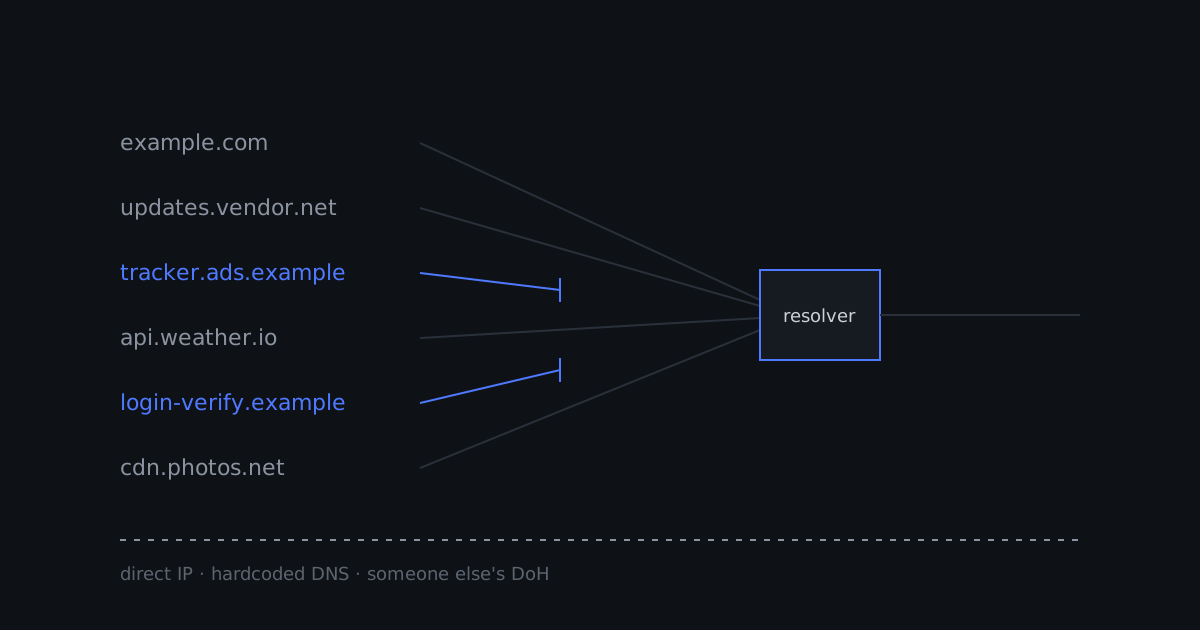
A lot of people set up DNS filtering, watch the “blocked” counter climb, and conclude that their network is now protected. Some of that confidence is earned. A lot of it is not.
DNS filtering is useful. It is also one of the easiest security controls to walk around, sometimes without anyone trying to. If you treat it as a firewall, it will eventually disappoint you. If you treat it as what it is, it is one of the cheapest wins you can get on a network.
So let’s be precise about what it is.
What DNS filtering actually does
Before almost any connection on the internet, something has to turn a name into an address. Your laptop asks a resolver “what is the IP for example.com?”, gets an answer, and only then opens a connection.
A filtering resolver sits in that path and checks the name against policy: block lists, allow lists, categories. If the name is allowed, you get the real answer. If it is not, you get a non-answer instead, usually NXDOMAIN or an address that goes nowhere. The connection never starts, because the client never learns where to connect.
That is the whole trick. It acts on names, at lookup time, and only for clients that ask that resolver.
What a firewall does
A firewall acts on traffic. It sees packets and connections: source and destination addresses, ports, protocols, connection state. It can allow or drop a connection regardless of how the client found the address, whether through DNS, a hardcoded IP, or a cached value from last week.
The two work at different layers and answer different questions. A DNS filter asks “should this name resolve?” A firewall asks “should this connection exist?” Neither question replaces the other.
Where DNS filtering falls short
This is the part that usually gets left out of the marketing.
1. Connections that never ask DNS. If malware, an app, or a device connects straight to an IP address, there is no lookup to filter. The NSA and CISA guidance on protective DNS says it plainly: it “is bypassed by any traffic using IP addresses directly without doing DNS lookups”, and organisations “should not rely on it alone”[1].
2. Devices that ignore your resolver. Your router hands out a DNS server over DHCP. Not every device listens. In research on consumer IoT devices by UCL and Inria, some devices ignored the network’s resolver settings and went to public resolvers such as 8.8.8.8 directly[3]. Your filter never sees those queries.
3. Encrypted DNS to someone else. DNS over HTTPS (DoH) and DNS over TLS (DoT) are good for privacy on the path between a client and its resolver. But if a browser or app uses encrypted DNS to a resolver you did not choose, your local filter is out of the loop. Both the NSA/CISA and UK NCSC guidance recommend blocking outbound DNS on ports 53 and 853 that does not go through your resolver, and the NSA/CISA document also recommends blocking unauthorised DoH servers[1][2].
4. It only knows names. A filter cannot see what happens on a connection it allowed. A legitimate domain that serves something malicious, or a compromised site you trust, looks fine at lookup time.
None of this is a flaw in any particular product. It is what operating at the name layer means.
So what is it good for?
Quite a lot, as long as you are honest about the layer.
Stopping known-bad destinations early and cheaply. Phishing domains, malware distribution, command-and-control infrastructure, tracking and ad networks. Blocking at lookup time means the connection never opens. NSA/CISA describe protective DNS as able to “block and alert on known malicious connection attempts”[1].
Covering devices you cannot install anything on. TVs, cameras, printers, thermostats, a guest’s phone. You cannot run an endpoint agent on a smart plug, but you can decide which names it gets to resolve, at least for the devices that use your resolver.
Seeing what your network is talking to. This is the underrated part. Query logs are a running list of every name your devices look up. The first time you look at what a “dumb” device on your network resolves all day, you will learn something. Logs turn DNS filtering from a blocker into a sensor.
Policy without much effort. Different rules for the kids’ devices, the office, the IoT VLAN. Changing a list is easier than maintaining firewall rules for thousands of shifting IP addresses behind CDNs.
Making it pull its weight
The fix for most of the weaknesses above is a few firewall rules, so that DNS filtering and the firewall cover each other.
Make your resolver the only resolver. On your router, redirect or drop plain DNS (port 53) that tries to leave the network for any server other than your filtering resolver, and drop DNS over TLS (port 853) to anything else. Leave an exception for the resolver itself, so it can still reach its upstream. This is a handful of rules on most routers, and it catches the devices that ignore DHCP.
Deal with browser DoH. You cannot block DoH by port, because it is ordinary HTTPS on 443. Firefox at least gives networks a signal: if your resolver returns NXDOMAIN for the canary domain use-application-dns.net, Firefox disables DoH that it had enabled by default. It will not override a user who turned DoH on themselves[4]. For managed devices, browser policies are the more reliable switch.
Use encrypted DNS to your own filter. The good use of DoH and DoT is pointing your devices at the filtering resolver you chose, over an encrypted connection. Then the queries are both private on the wire and still subject to your policy.
Keep a firewall for the things DNS cannot see. Outbound rules for IoT segments, blocks on known-bad IP ranges, and egress limits for devices that have no business talking to the whole internet.
Read the logs. At least once. Then occasionally.
The honest summary
DNS filtering is not a firewall, and it does not need to be. It is a cheap, wide, early filter and a surprisingly good sensor. It works best when a few firewall rules make sure every device actually uses it.
We build filtering into Dinio DNS, alongside authoritative DNS and a public resolver with DoH and DoT. We call it filtering on purpose, because that is what it is. If you want to try it on your own network, join the waitlist.
Sources
Get new posts by email
Technical notes on our DNS platform and engineering work, sent when we publish. No spam.